
On project after project I rebuilt the same foundation before I could write a single line of the thing I was actually being paid to build. Authentication with sessions and refresh tokens. An admin panel to manage users. Some way to know what happened when something went wrong. A typed client between the API and the UI so the two halves stayed in sync. And the moment anything went to production in the EU, where I live, it had to satisfy GDPR: data export, account deletion, consent. Every time, the first month went to boilerplate instead of the product.
The frustrating part is that none of this is the interesting work. It is table stakes. Nearly every SaaS needs it, it looks much the same from one to the next, and getting it right is fiddly and slow. So I built Slicekit: the foundation I wish I’d had, assembled and tested once, so the first thing you build is your product instead of your boilerplate.
The Same First Month, Every Time
Starting a new SaaS from an empty repository means weeks of work before you have anything a user can see. You wire up auth, and auth alone is a project: password hashing, sessions, refresh-token rotation, two-factor, OAuth, account lockout, password-reset flows. Then you need an admin surface to actually run the thing, so you build user management, permission grants, and a way to revoke a session when something looks wrong. Then you realise you have no idea what your system is doing in production, so you bolt on logging, metrics and tracing. Then a customer in Europe asks for their data, and you discover GDPR is not a checkbox.
Boilerplate templates exist, but most stop at a login page and a styled dashboard. The hard parts, the ones that actually take the weeks, are left as an exercise. And the parts they do include are often a grab bag of whatever was trendy, with no coherent architecture holding them together, so extending them feels like fighting the template rather than building on it.
I wanted something different: a complete, opinionated foundation where the decisions are already made, the hard parts are solved, and the structure is consistent enough that adding your own features feels obvious.
What Slicekit is
Slicekit is a full-stack SaaS template in three parts: an event-driven .NET 10 API, a typed React 19 single-page app, and an Astro marketing site, all sharing one set of conventions. You buy it once under a commercial license, clone it, and start building. It is not a hosted service or a subscription. The entire repository is yours.
Setting up your own project is a single command. The scaffold script clones the template and renames everything across all three apps at once: the project name and namespaces, the domains, the support email, and the API-key prefix. It regenerates your dev and production secrets, writes the env files, and reinitialises git, so what you end up with is genuinely your project from the first commit.
curl -fsSL https://slicekit.dev/scripts/new.sh | bashIt prompts for the project name and the rest as it goes, with sensible defaults, so there is nothing to memorise. You can also pass everything as flags if you want to script it or let an AI handle the setup.
Why this stack
The obvious question when you see ”.NET”: why not Node? Most templates use Node, the hiring pool is bigger, and serverless deployment is one click away. If you’re building a thin layer over a few APIs or need a demo as fast as possible, Node is a reasonable choice.
But Slicekit is meant as a foundation for something you run for years. That changes the trade-off. .NET is a compiled, statically typed runtime that performs well without requiring you to engineer around it. The tooling ecosystem (SDK, test runners, EF Core, editor integration) is maintained by one party on a long support window, so you’re not assembling a pipeline from twelve packages that each break on their own schedule. And C# is boring in the way infrastructure should be: the patterns are well understood, the people who know them aren’t hard to hire, and in three years you can still staff a team around it.
The frontend is a separate React SPA rather than a fullstack framework like Next.js. The reason is simple: the API is a proper API with its own contract, not something tied to a rendering framework. That makes it usable from other clients and keeps the two halves honestly separated.
The marketing site is Astro. For content-heavy static sites it’s the obvious pick: zero JavaScript shipped to the browser by default, good SEO out of the box, and fast without having to think about it. Docs and blog posts are just Markdown files.
The central idea is the vertical slice. A feature lives as a self-contained slice on both sides of the stack: a folder in the API holding its domain, commands, queries and endpoints, and a matching folder in the frontend holding its routes, components and data hooks. Features do not bleed into each other. That is what makes the codebase navigable, what makes removing something you don’t need a matter of deleting its folders, and what makes it productive for AI coding agents, which get a clear map of where everything goes.
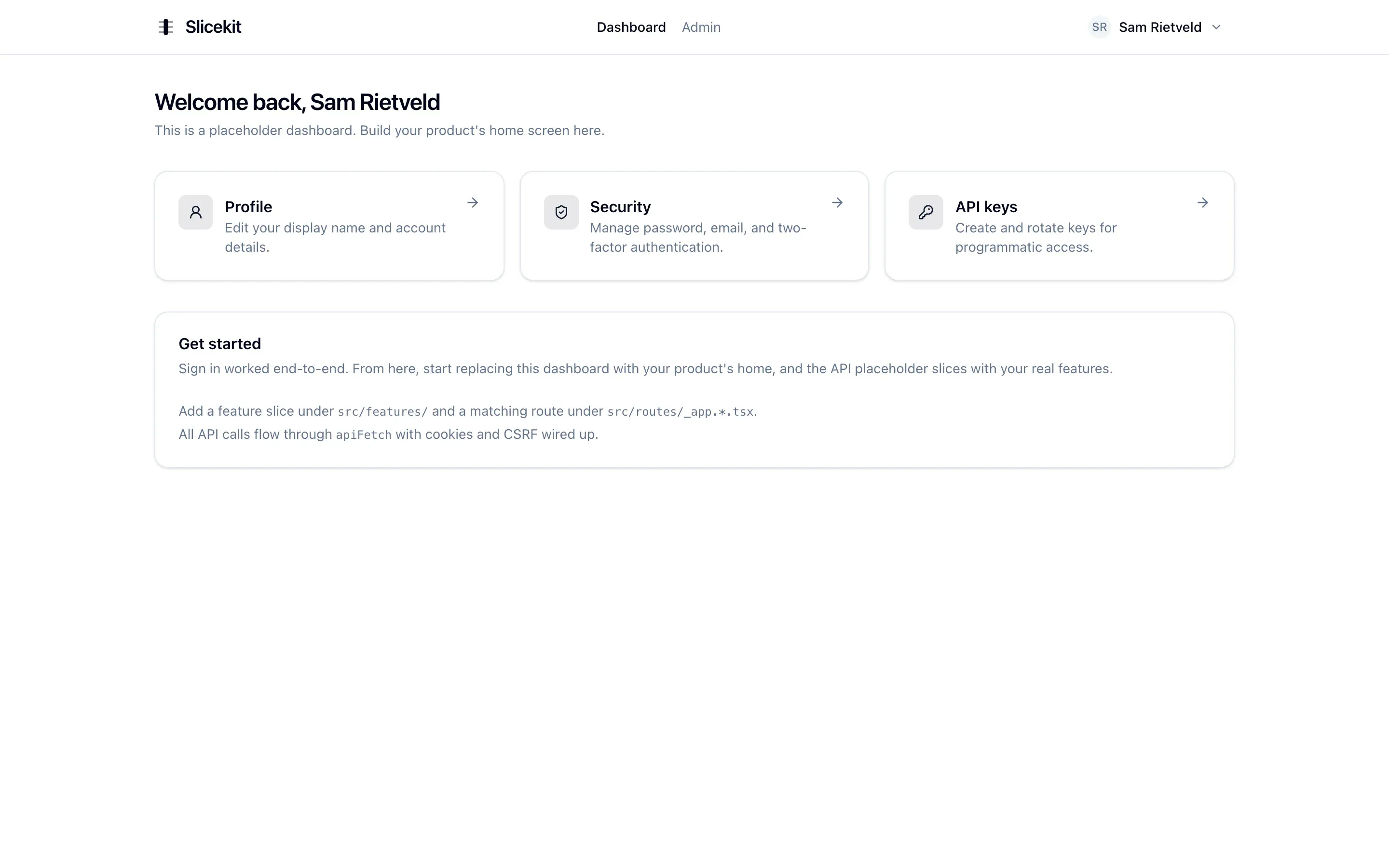
The SPA after sign-in. Auth, the typed API client, and the settings area all work end to end out of the box.
What’s Inside
I’ll walk through it in the order you’d build a new project from scratch. That’s what taught me which parts actually matter, and everything below is already finished and working the moment you clone it.
Auth
Auth is the part that quietly expands until it has eaten a month, so I treated it as a feature in its own right and finished it properly. Signing in runs on cookie-based sessions with JWTs stored in HttpOnly cookies, with CSRF protection and refresh tokens that rotate on every use. If a stolen token is ever replayed, family-based detection spots the fork and tears down the whole token lineage at once. The cases that are easy to put off until they bite are already in the box: passkeys for modern passwordless login (WebAuthn/FIDO2), TOTP two-factor with recovery codes for the day a phone goes missing, and OAuth through Google and GitHub behind an interface you can extend with another provider. New passwords are checked against Have I Been Pwned and refused if they have leaked, repeated failures trip an account lockout, and anything personally identifiable is encrypted before it reaches the database.
For authorization I deliberately avoided roles. Roles feel tidy until you have a support agent who can view users but not delete them. There’s no role for that, so you create one. Then another, for someone who can also unlock accounts but not reset passwords. It always ends the same way: more roles than features, and nobody can remember what support_tier_2 is actually allowed to do. Slicekit uses 41 explicit permissions per action instead, all declared in one file. The same set drives the UI, so the API and frontend never drift apart. A user never sees a button they can’t use. An API key gets exactly the permissions you give it and nothing more. Rate limiting, security headers, and correct handling of reverse-proxy headers are all just there.
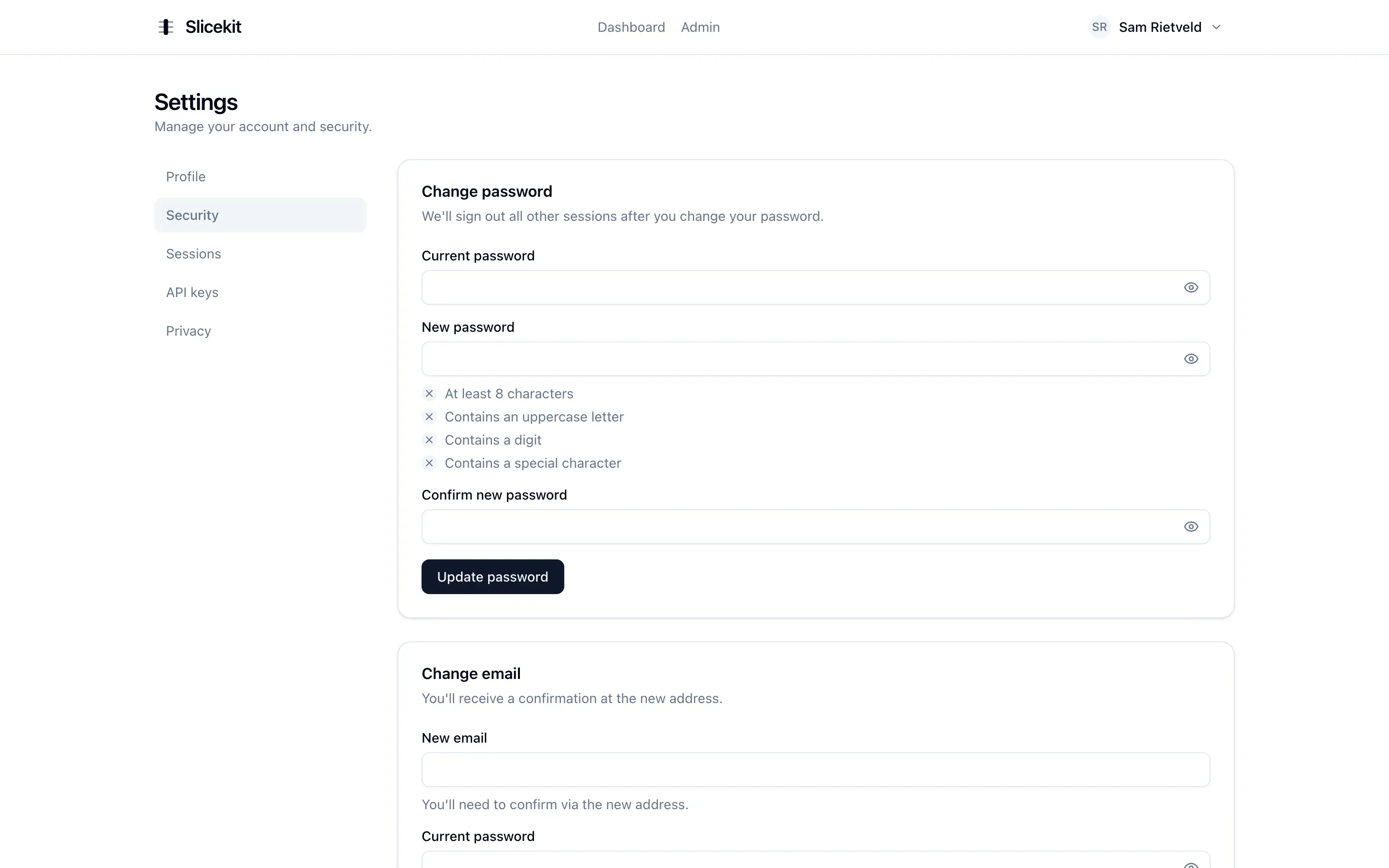
The settings area: change password with live policy checks, change email with confirmation, and manage two-factor.
The admin panel
Sooner or later a product needs a back office, and most templates gesture at it and move on. Slicekit’s is built. You get paginated user management and a detail page for each account where you can grant permissions, revoke a session that looks wrong, manage someone’s API keys, disable an account, clear a lockout, or send a password-reset or verification email on their behalf. When you need to see exactly what a user sees, you can impersonate them, and Slicekit records the reason and stamps an act claim on everything done while impersonating, so the trail always knows it was you acting as them.
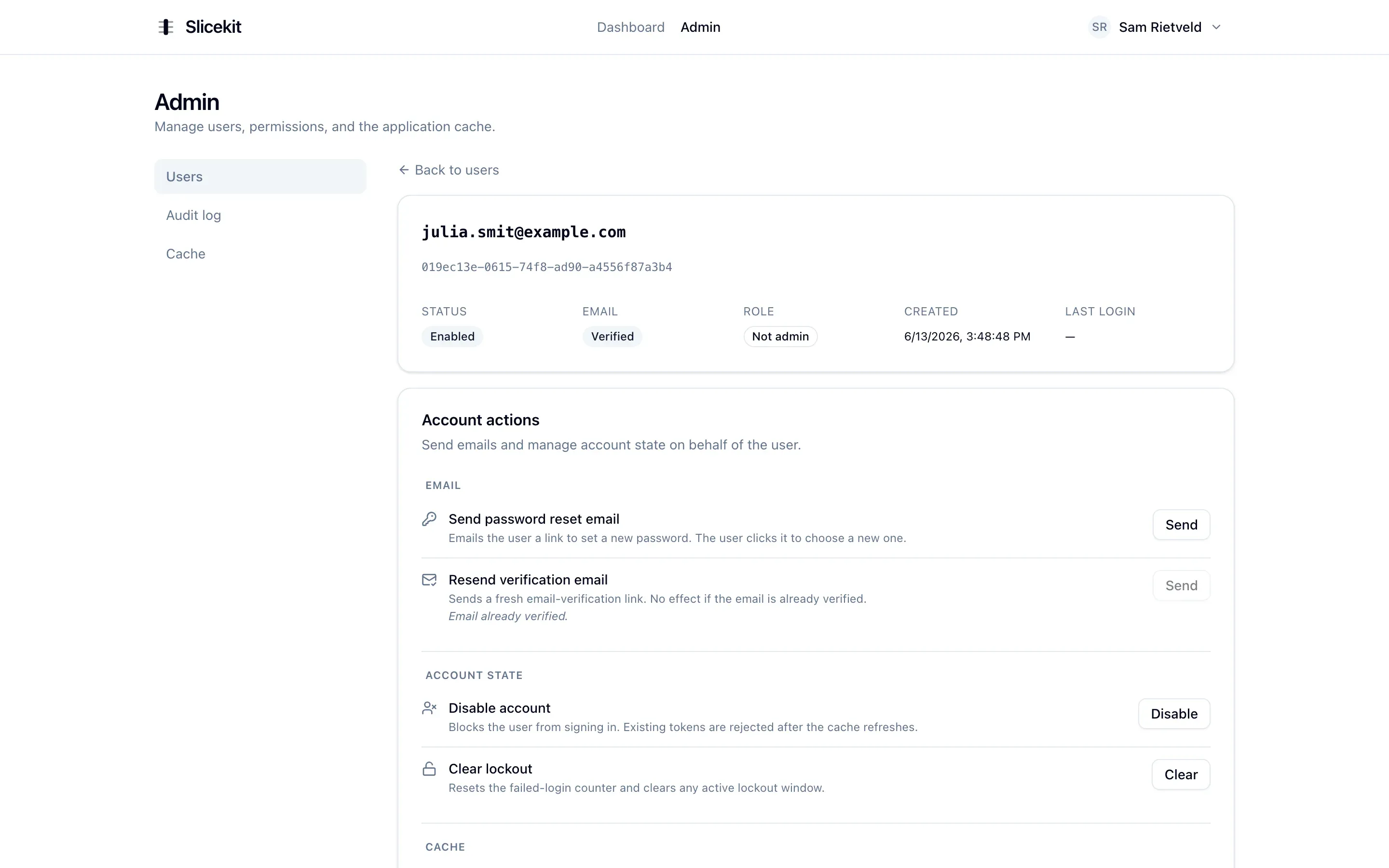
A user detail page in the admin panel: status, account actions, and the controls to manage that account.
The permission model from a moment ago becomes something you can actually touch here. You stage a set of changes, see at a glance which permissions are read-only, and apply them in one move, with nothing written until you confirm. Promoting someone to admin hands over the full set out in the open, so who can do what is always something you can read straight off the screen.
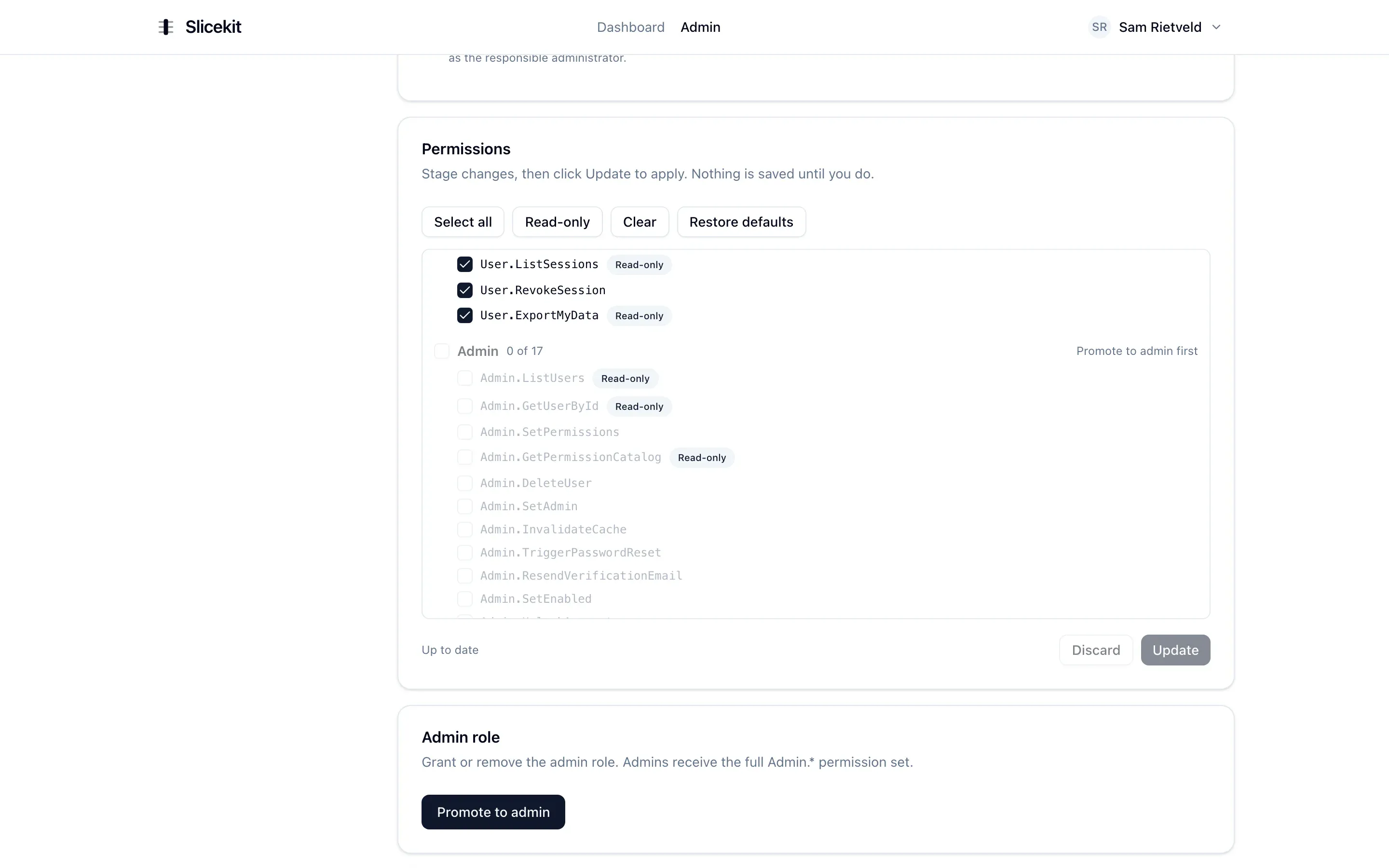
Staging permission changes for a user. Authorization is built on 41 explicit permissions, and the same set gates the UI.
Audit log and GDPR
The question that drove a lot of this is the one that only surfaces after something has already gone wrong: what actually happened? So every meaningful action lands in a hash-chained audit trail, a tamper-evident record you can read straight from the admin panel, search through Loki, and follow into Grafana when you want the full trace. You filter by time window, category and outcome, and watch a single request travel from end to end.
Living in the EU, I also know GDPR is not something you bolt on the week before launch. Data export and account deletion with anonymization are part of the foundation, so European projects are covered from the first commit.
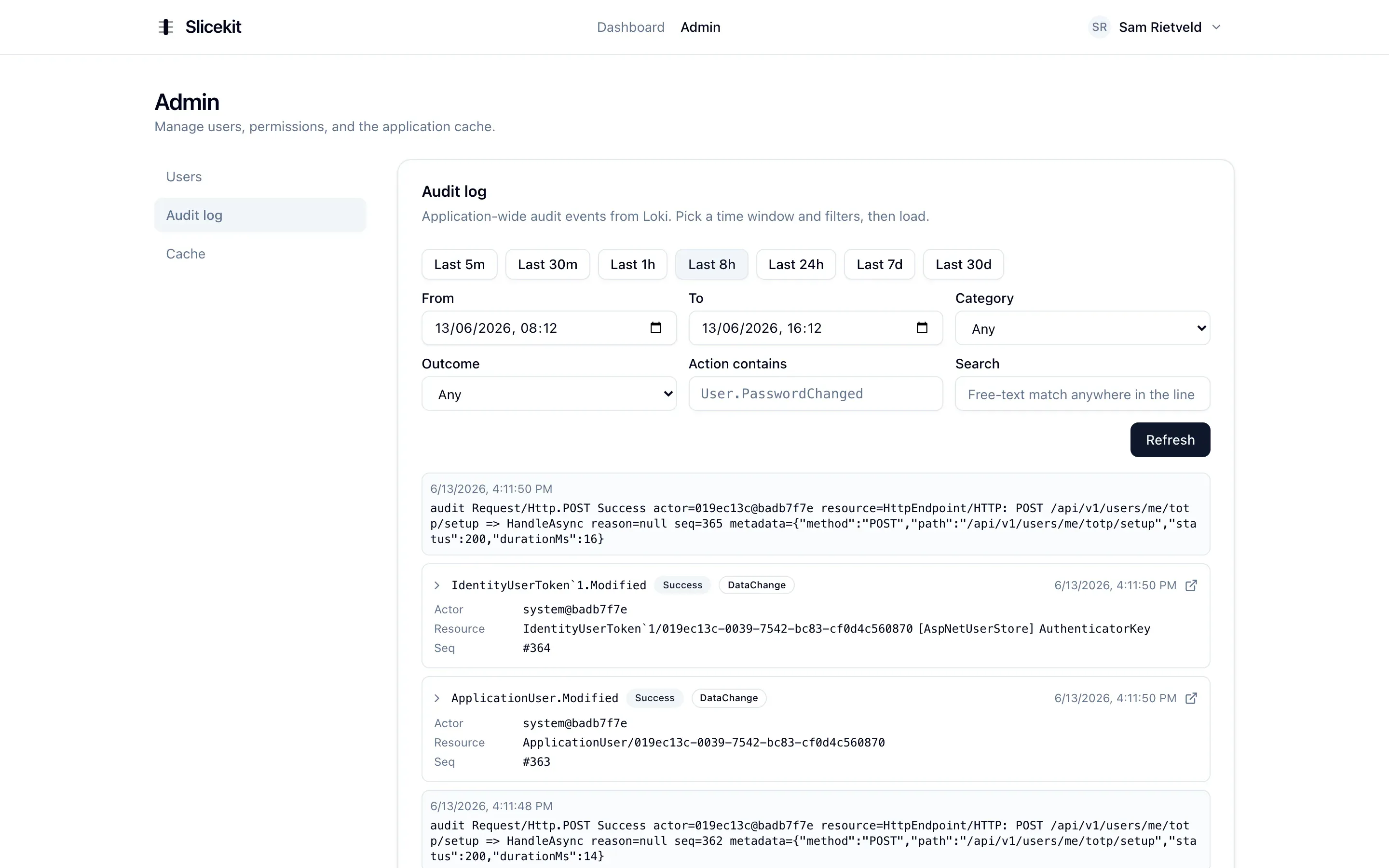
The hash-chained audit trail, searchable by time, category and outcome, with deep links into Grafana.
Billing
Most products eventually need to charge, and that turns into its own swamp: Checkout, a customer portal, webhooks that must never double-process, and the awkward question of where the truth about a subscription actually lives. Slicekit ships it. Recurring subscriptions run through Stripe Checkout, every plan comes with a free trial, and customers manage their own card and plan through the Stripe Customer Portal. Stripe is the source of truth: your products and prices live in the Stripe dashboard, and the app stores only the subscription state it syncs back through signed, idempotent webhooks, so a duplicated delivery or a cancellation made on Stripe’s side is handled correctly instead of trusted blindly.
What turns that into real product behaviour is feature-key entitlements. From the admin panel, with no deploy, you map keys onto your Stripe products: boolean flags like priority support, and numeric limits like ten API keys on Starter and a hundred on Pro. The app resolves the right entitlement for each user from their active subscription and enforces it in the slice that does the work. And because Stripe holds the invoices, not the app, GDPR and tax retention stop fighting each other: deleting an account cancels the live subscription and clears the local rows, while the invoices stay in Stripe to satisfy multi-year tax-retention obligations. Like the rest of the template, the whole feature is removable as a unit for the products that never charge.
The engine room
Under the API is an architecture I deliberately did not cut corners on, because it is the part you cannot retrofit later. Domain-driven aggregates raise events as the business rules play out. Wolverine runs the CQRS flow, with FluentValidation guarding the way in. Those events leave the system through a transactional outbox in PostgreSQL and travel to RabbitMQ with at-least-once delivery and idempotent consumers, so a message survives even when a downstream service is having a bad moment. Around that core sit the pieces most products reach for and few people enjoy wiring up: persistence through EF Core with soft-delete filters, caching with FusionCache over Redis, transactional email via FluentEmail and Razor templates, and file storage on anything S3-compatible, with MinIO standing in on your laptop. The whole API documents itself through OpenAPI 3.1 and Scalar, is versioned, health-checked, and ready to run background jobs.
The frontend
The SPA is React 19 on Vite with TypeScript in strict mode. TanStack Router gives it file-based routes with typed links and automatic code splitting, TanStack Query handles the data, and a single typed API client sits between the two halves, carrying cookies, CSRF and a silent refresh-and-retry so feature code never has to think about a token expiring. Forms run on React Hook Form and Zod, and a validation error from the server lands back on the exact field that caused it. It ships with English and Dutch, light, dark and system themes, an interface gated by those same permissions, and a complete settings area covering profile, security, sessions, API keys and privacy.
Shipping
The last stretch is the work that lets you trust a change before it goes out. OpenTelemetry sends traces, metrics and logs to Tempo, Prometheus, Loki and Grafana, which arrives with four dashboards, six alert rules and Alertmanager already wired. Four test projects cover the quality: fast unit and architecture tests, feature tests that run against a real database through Testcontainers, and API tests. CI builds both apps, runs the whole suite, and scans for vulnerable packages on every pull request, and a merge to main produces a multi-stage Docker image pushed to the registry with a software bill of materials and a provenance attestation attached.
Removing features
A template that only lets you add things is only half useful. Most products will not need everything Slicekit ships, so I spent real effort making features removable. Because a feature is a vertical slice on both sides, removing it stays contained to that slice: delete the slice folder in the API, its endpoints, and the matching frontend folder, then follow a short documented cleanup for the schema and events. The architecture tests then fail the build if anything still references what you removed, so you cannot leave a dangling half-deletion. The structure that makes the code navigable is the same structure that makes it safe to cut down to size.
The checkout runs on my own tools
Selling the template needed a checkout, and rather than reach for a heavy e-commerce stack I assembled one from pieces I already had. When you pick the Solo or Team license, a small dialog asks for two things: your GitHub username and your email. That form posts to StaticForm, another of my projects, which hands off to Stripe and returns a Checkout URL. You pay on Stripe, and that is the only place your card details ever touch.
When the payment succeeds, StaticForm fires three submit actions off the back of that one form:
- A webhook to the GitHub API that invites your username to the private repository, so access lands in your inbox within seconds of paying.
- An order confirmation to your email.
- A notification to me that someone just bought Slicekit.
It feels fitting that StaticForm quietly does the boring work for Slicekit. Both tools built to take the boilerplate off your hands: one for website forms, one for SaaS.
What I learned
Auth turned out to be much deeper than I expected. I started this thinking authentication was a more or less solved, copy-and-paste problem. It is not. Getting passkeys, refresh-token rotation, family-based theft detection, breach checking, lockout and CSRF to work together, and to keep working as I changed things around them, took far longer than the parts of the app a user actually sees. I came out with a lot more respect for how much hides under a login form.
The vertical slice was the best architectural decision I made. At the start I had to choose: features that share a lot of code, or each feature standing on its own on both sides of the stack. I went with self-contained, and I’d do it again without hesitation. Six months later I can still find what I’m looking for quickly, and the structure means I’m rarely afraid to change something. A codebase I can hold in my head is worth more than a clever solution I won’t understand three months from now.
I trust the project because I read all of it. It would have been quicker to generate big chunks with AI and move on, but a template is a promise: someone is paying on the assumption that the hard parts are actually correct. So nothing went in unread. The architecture tests, the integration tests against a real Postgres, the hours spent on defaults: that’s what makes me comfortable selling it.
GDPR, data anonymization and audit logs were completely new to me. I knew GDPR existed and had a rough idea of what it meant in practice (being able to export and delete data), but doing it properly turned out to involve a lot more than I expected. I learned:
- How to delete an account without breaking the audit history.
- Which fields need to be anonymized and which ones you’re allowed to keep.
- How a hash-chained audit log works so you can prove after the fact that nothing was tampered with.
The code was the easy part. Building and selling a product involves a lot more than just writing code. How to price it, how to write a license, what an unfamiliar developer needs in the docs before they’ll trust it, how to get it in front of the people who would actually want it. All of that determines whether the code is worth anything to anyone but me. I’m still figuring most of it out.
Current status
Slicekit is live, with a public marketing site, full documentation, and a seeded demo environment where you can sign in as either an admin or a normal user and explore the whole surface without signing up. It is a one-time purchase under a commercial license, Solo or Team, with lifetime updates included and a money-back guarantee.
The goal stays the same as the reason I built it: hand you a foundation where the decisions are made and the boilerplate is solved, so your first commit is a feature. If you want to take a look, it is at slicekit.dev.
Have feedback, questions or an idea you want to build with Slicekit? Feel free to get in touch.